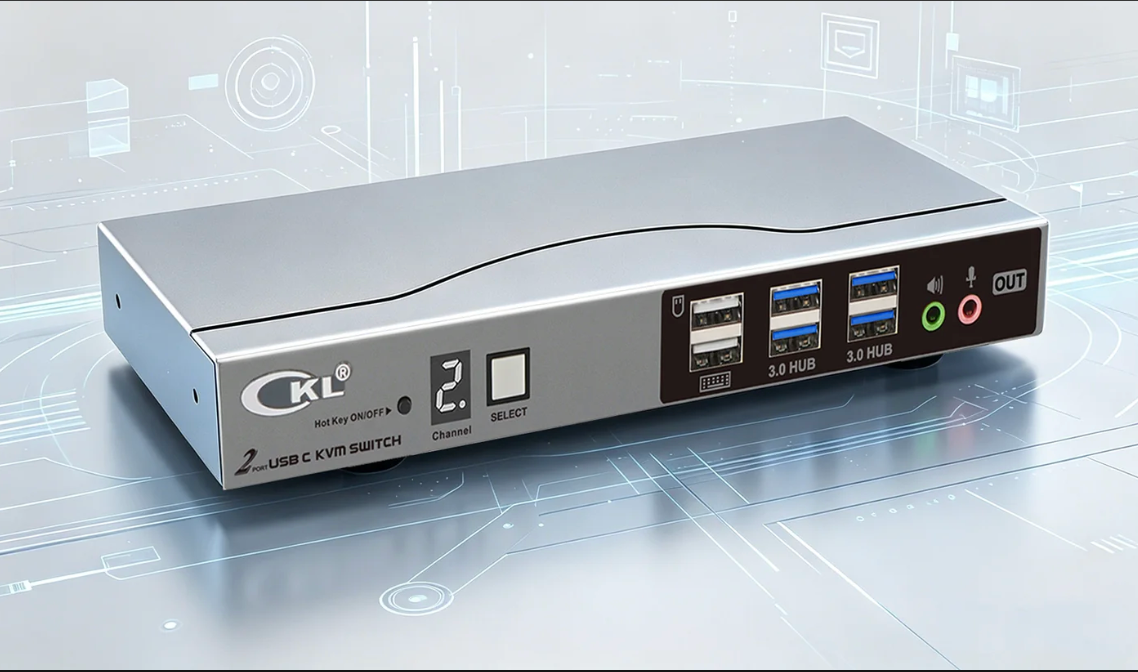
What Makes CKL Multi-Viewer KVM Switch Stand Out
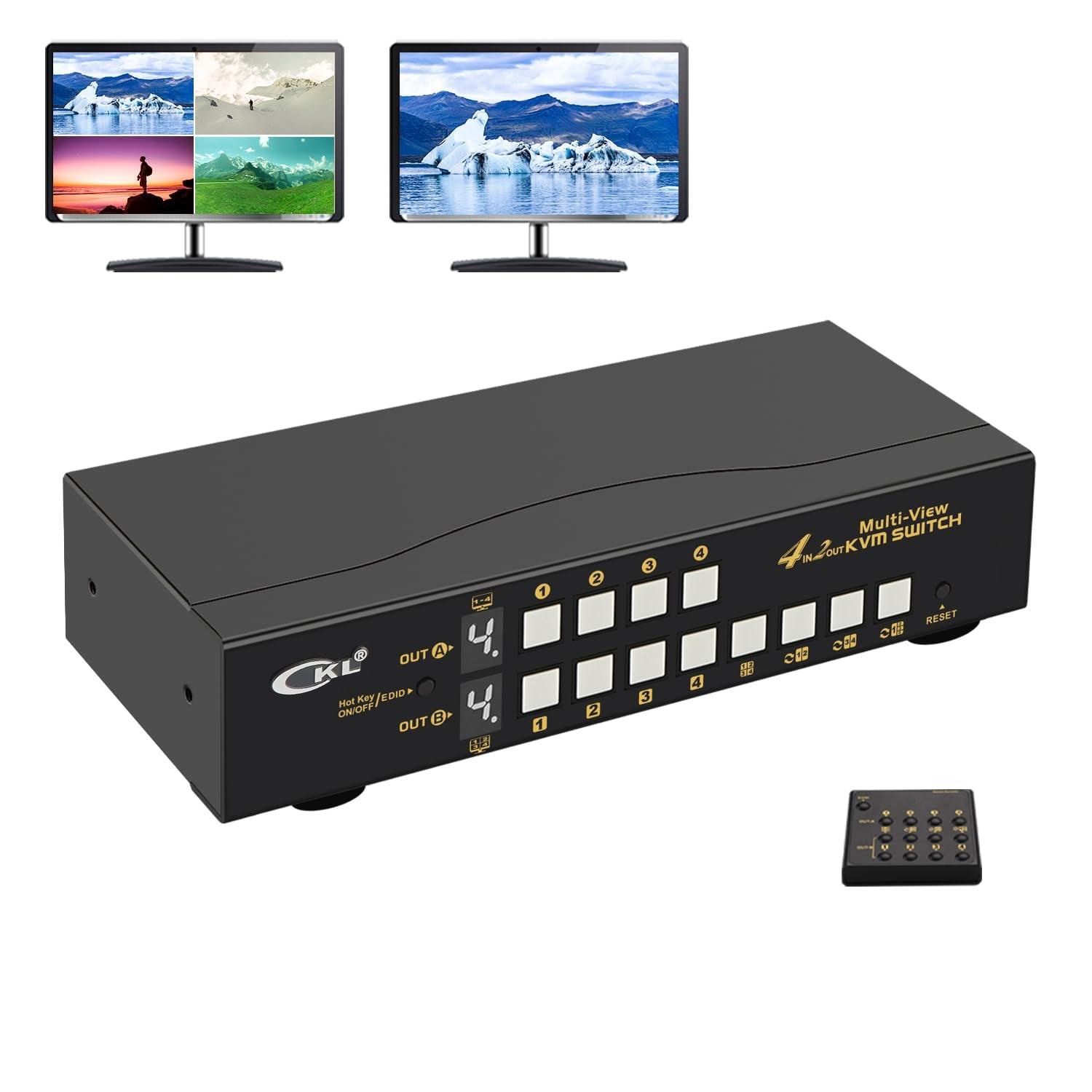
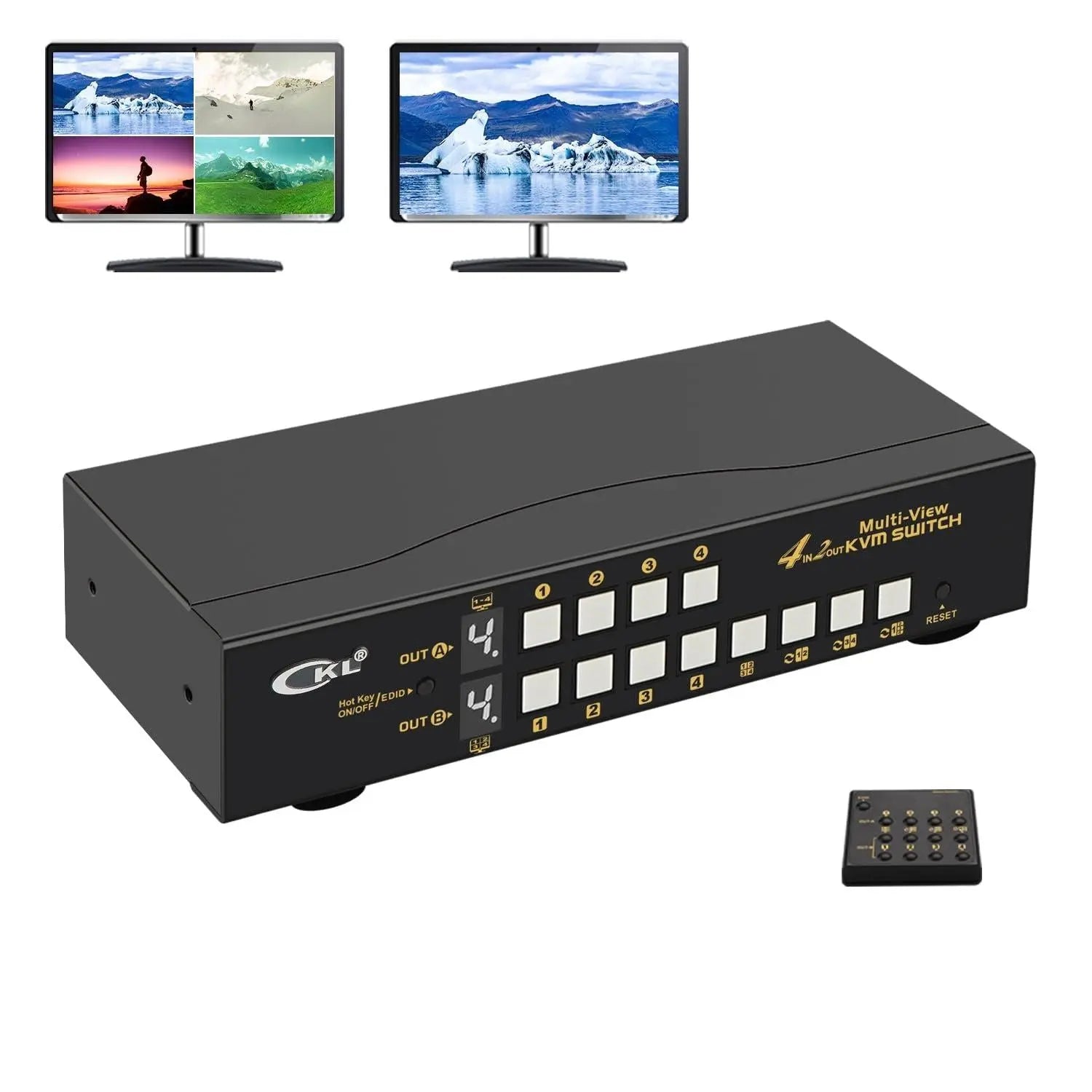
You want a multi-viewer kvm switch that really makes work easier. CKL’s 4 Port HDMI Split Multi-View KVM Switch Dual Monitor with Cables lets you use four computers with only two monitors. This gives you more ways to work. You get cool features like picture-in-picture and different display modes. You can set up your workspace the way you want. More companies need many people to use the same computers. CKL is a great choice for this and is popular in the market.
Key Takeaways
CKL's Multi-Viewer KVM Switch lets you use 4 or 2 computers with two monitor outputs, one for devided view of 4 input sources, the other for single view of any of the 4 input sources. This helps you work better and faster.
There are variatiy of display modes available like devided view, matrix view and picture in picture to meet different needs. These modes make it easier to do many things at once and keep things neat.
You can switch computers in different ways, like using keyboard hotkeys or a wired remote. This makes switching quick and easy.
The switch shows high-quality pictures up to 4K@30Hz. Your images will look sharp and clear for every job.
CKL's KVM switch works with many operating systems. It makes your setup simple by cutting down on mess and extra devices.
Unique Features of CKL Multi-Viewer KVM Switch
Dual Monitor and Multi-Port Design
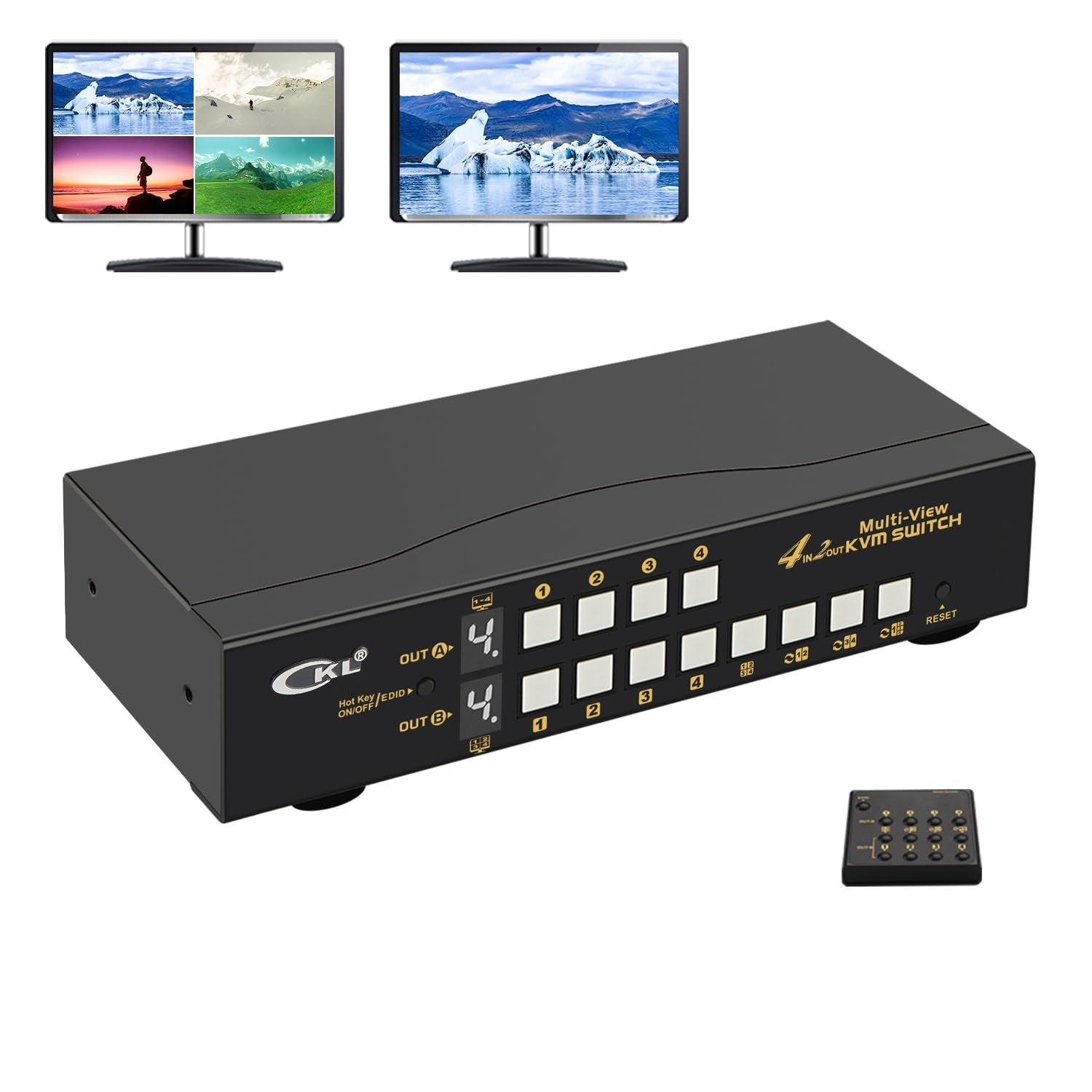
You want a workspace that keeps up with your busy day. The CKL multi-viewer kvm switch gives you dual monitor support and four HDMI ports, so you can connect up to four computers and use two monitors at the same time. This setup lets you extend your display or mirror it, depending on what you need. You can transfer data quickly with USB 3.0 ports, which move files up to ten times faster than older USB 2.0 ports.
Here’s a quick look at what you get:
Feature |
Description |
|---|---|
Dual Monitor Support |
Use two monitors for extended or mirrored display from any computer. |
Resolution Capabilities |
Enjoy sharp images with up to 3840x2160 (4K)@60Hz and other high resolutions. |
USB 3.0 Data Transfer Rate |
Move files fast with speeds up to 5Gbps. |
Switching Modes |
Choose from keyboard hotkeys, push button, mouse roller, wired remote, or auto scan. |
You can switch between computers without unplugging anything. This saves you time and keeps your desk neat.
Flexible Display Modes and PIP
You get more ways to see your work with the CKL multi-viewer kvm switch. You can pick from several display modes, so you always have the right view for your task. If you need to watch all four computers at once, use Quad View. Want to focus on just one? Switch to Single View. Matrix View lets you arrange screens in different ways. The Picture-in-Picture (PIP) feature is great when you want to keep an eye on another computer while working on your main screen.
Check out the display options:
Display Mode |
Description |
|---|---|
Quad View |
See all four computers on one screen. |
Single View |
Focus on one computer at a time. |
Matrix View |
Arrange multiple sources across your monitors. |
PIP |
Watch another computer in a small window while you work on the main screen. |
You can change modes with just a few clicks. This flexibility helps you multitask and stay organized.
Multiple Switching Methods
Switching between computers should be easy. The CKL multi-viewer kvm switch gives you several ways to do it. You can use keyboard hotkeys, press a button on the front panel, double-click your mouse roller, or use a wired remote. You don’t have to stop what you’re doing or reach for cables.
Keyboard hotkeys
Push button on the front panel
Double click mouse roller
Wired remote
You can pick the method that feels best for you. Quick switching means you get more done in less time.
Tip: Try the Glide-and-Switch feature. You can move your mouse to another screen and control a different computer instantly. This makes switching even faster.
High Resolution and Compatibility
You want your screens to look sharp and clear. The CKL multi-viewer kvm switch supports up to 4K resolution at 60Hz, so your images and videos look amazing. You can use this switch with almost any computer. It works with Windows, Linux, Unix, Mac, and other systems.
Maximum supported resolution: 4K@60Hz
Specific model supports: 4K@30Hz
Compatible with Windows, Linux, Unix, Mac
Operating System |
Supported |
|---|---|
Windows |
Yes |
Linux |
Yes |
Unix |
Yes |
Mac |
Yes |
Others |
Yes |
You don’t have to worry about compatibility. Just plug in your devices and start working.
The CKL multi-viewer kvm switch helps you work smarter. You can control up to four computers with one keyboard and mouse, saving space and making your desk cleaner. High-speed USB and audio output keep everything connected. You get more done with less hassle.
Multi-Viewer KVM Switch in Action
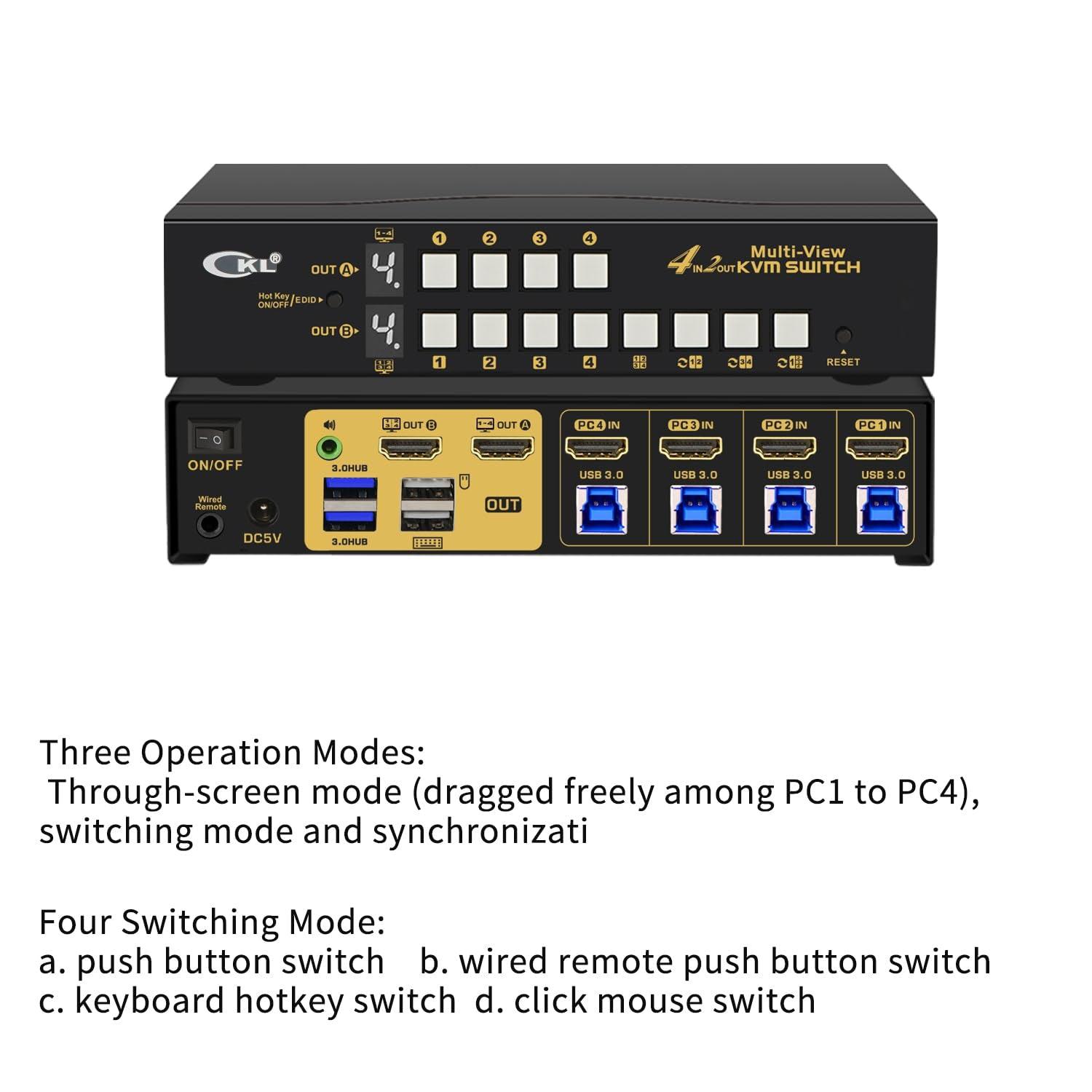
Display Modes and User Interface
When you use the CKL multi-viewer kvm switch, you get a user interface that feels simple and clear. You can pick from different display modes with just a few clicks. Want to see all your computers at once? Choose Quad View. Need to focus on one? Switch to Single View. The Picture-in-Picture mode lets you keep an eye on another computer while you work. You do not need to dig through menus or read a thick manual. The buttons and remote make it easy to change views fast.
Here’s what you can do with the display modes:
Quad View: Watch all four computers on one screen.
Single View: Zoom in on one computer for detailed work.
Matrix View: Arrange screens in a way that fits your tasks.
PIP: Keep a small window open for another computer.
Tip: Try switching modes during a busy day. You will see how quickly you can move from one task to another.
Workflow Efficiency and Switching
You want your work to flow without stops. The CKL multi-viewer kvm switch helps you do that. You can move your mouse from one screen to another and control a different computer right away. This saves space and keeps your desk neat. You do not need extra keyboards or mice. You just use one set for everything.
Check out how these features boost your workflow:
Feature |
Benefit |
|---|---|
Optimizes space and boosts productivity |
|
Real-time control of multiple computers |
Cuts down on extra USB devices and keeps your desk tidy |
Simultaneous monitoring of multiple sources |
Makes your work easier in places like control rooms or supermarkets |
You can switch computers using hotkeys, a button, your mouse, or the remote. This means you never lose time unplugging cables or searching for the right device. You stay focused and get more done every day.
Real-World Applications
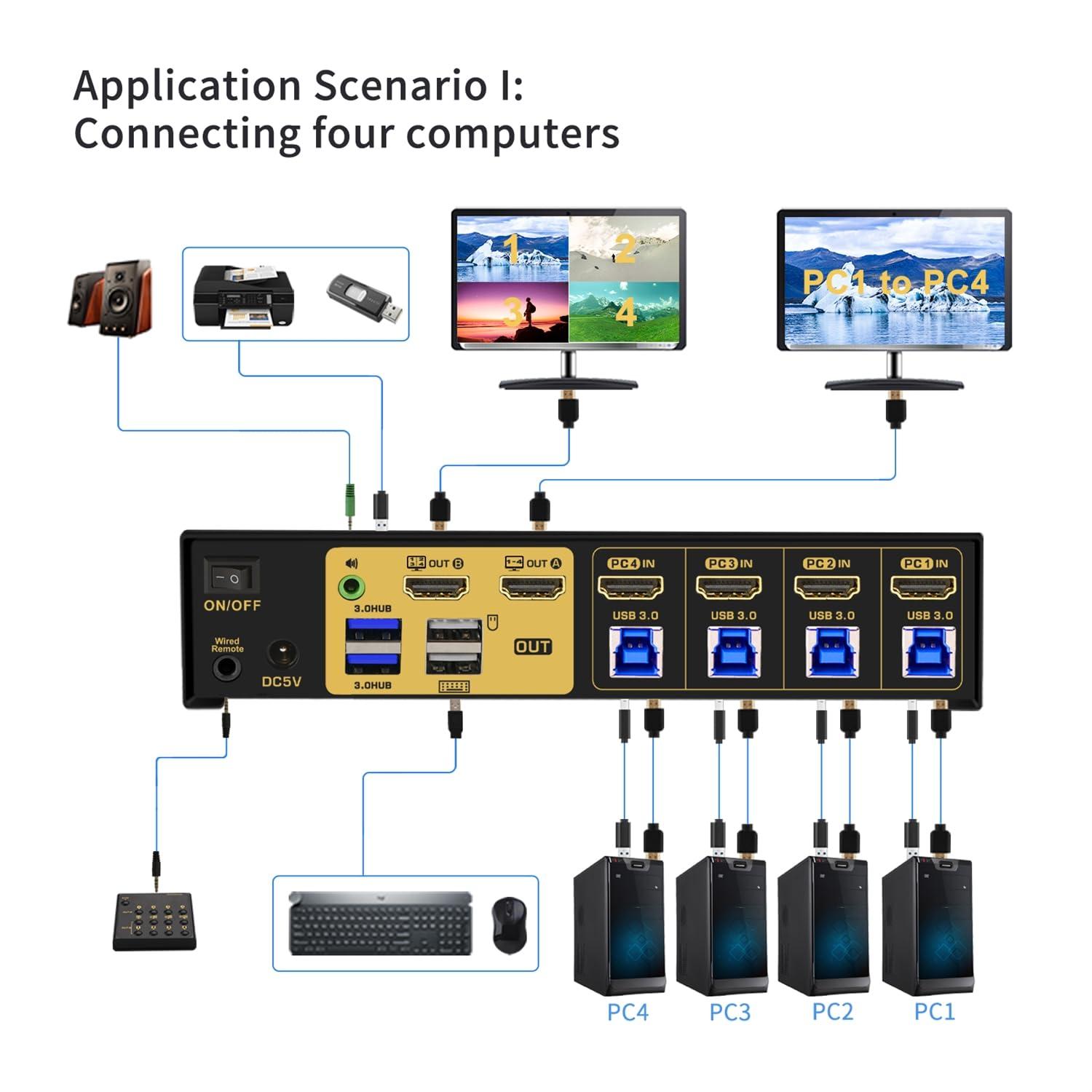
Trading and Financial Operations
You work in a fast-paced trading room. You need to watch market data, news feeds, and trading platforms at the same time. The CKL multi-viewer kvm switch helps you do this with ease. You can set up two monitors and connect four computers. You switch between screens with a tap or a hotkey. You keep your eyes on every detail and react quickly. The Picture-in-Picture mode lets you track a live feed while you make trades. You never miss a beat, and your workspace stays neat.
Tip: Use Quad View to watch all your trading platforms at once. You can spot trends and make decisions faster.
Control Rooms and Security
You manage a control room or security center. You need to monitor several systems and respond fast. The CKL multi-viewer kvm switch gives you centralized control. You use one keyboard and mouse to handle everything. You switch between computers in seconds. Your desk stays organized, and you avoid clutter.
Here’s how CKL helps you in control rooms:
Benefit |
Description |
|---|---|
Centralized Control |
Switch between systems easily, boosting efficiency. |
Enhanced Security |
Keeps systems separate, stopping unauthorized access. |
Operational Efficiency |
Troubleshoot quickly, reduce downtime during incidents. |
Reduced Clutter |
Fewer devices on your desk, more space to work. |
Cost Savings |
No need for extra keyboards and mice, saving money. |
You control multiple computers with one set of devices.
You use Full-Screen or Quad-Screen modes for flexible viewing.
Glide-and-Switch lets you move your mouse and switch systems fast.
Creative and IT Workspaces
You design graphics, edit videos, or manage IT systems. You need to multitask and keep your workflow smooth. The CKL multi-viewer kvm switch lets you connect all your workstations. You switch between computers without moving your hands from the keyboard. You use dual monitors to compare designs, edit files, or run tests. Your workspace looks clean, and you work faster.
Note: Creative pros love the Picture-in-Picture mode. You can preview a video on one screen while editing on another.
You get more done with less effort. The CKL multi-viewer kvm switch fits right into your daily routine, making your job easier.
Multiple Display Modes Available:
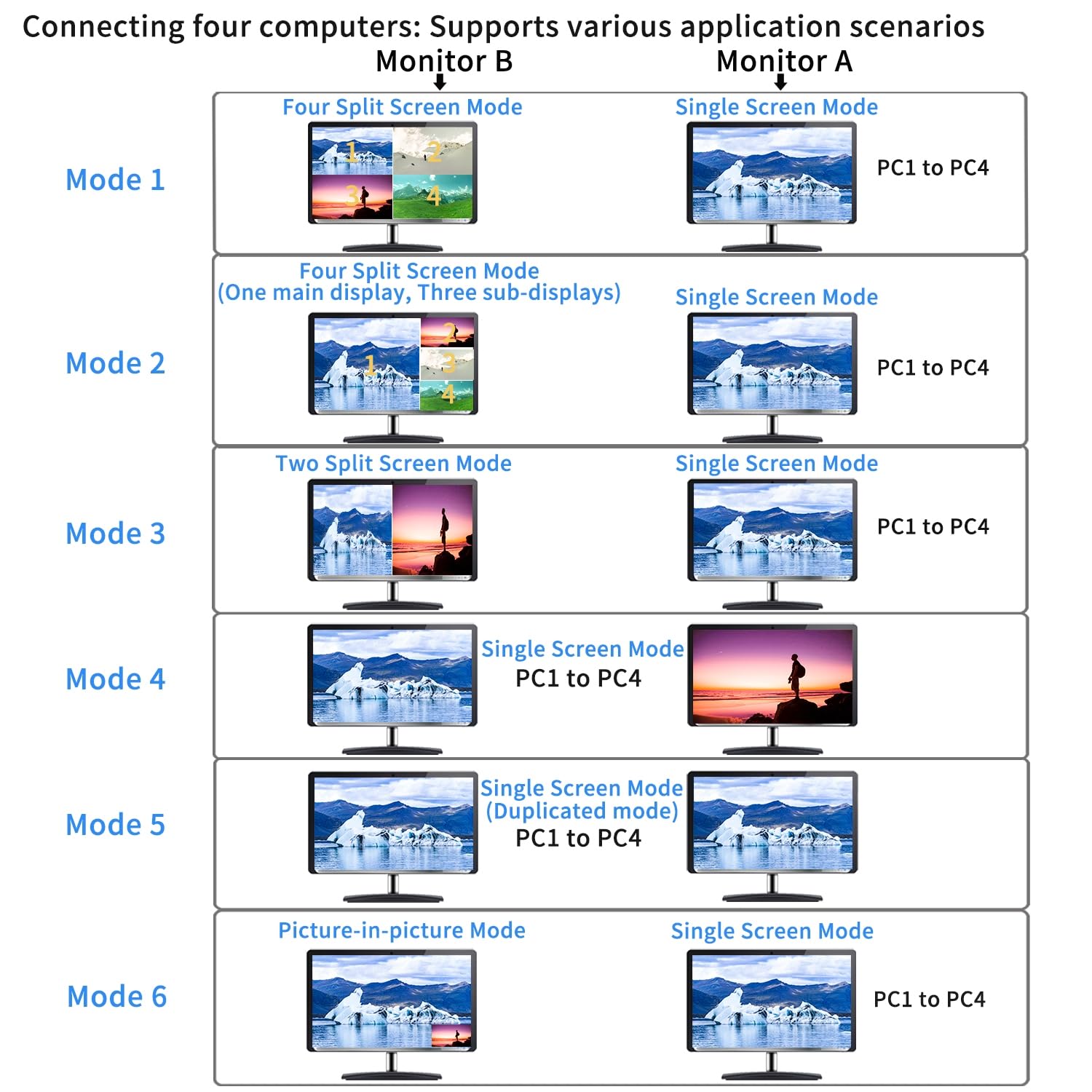
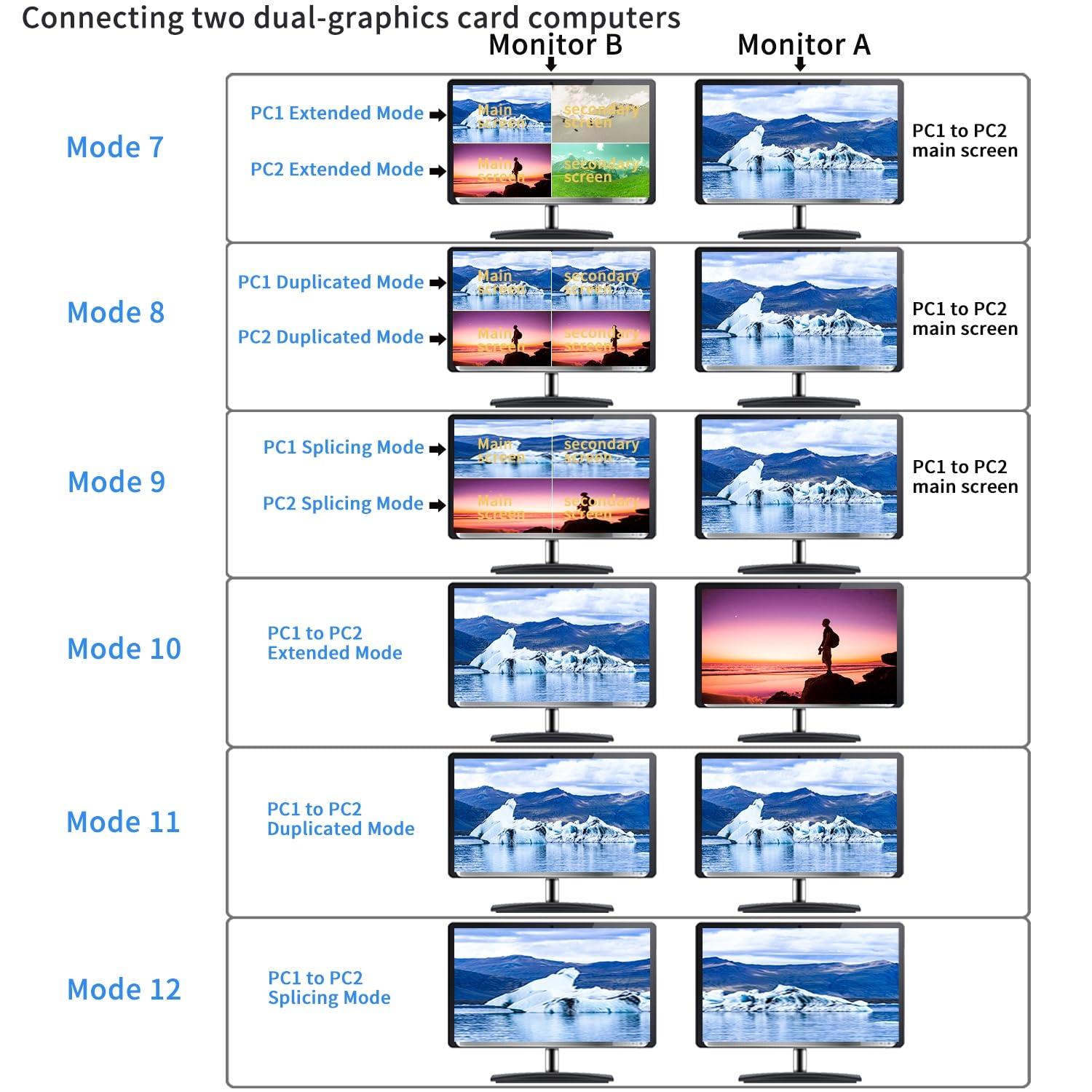
Feature Comparison
You want to know how CKL stacks up against other multi-viewer KVM switches. Let’s look at the features side by side. CKL gives you a strong mix of display options, switching methods, and connectivity. You get two monitors with 4K@30Hz resolution. You can use multi-view, extended displays, and matrix modes. Switching between computers feels easy with one-touch buttons and a remote control. You also get high-speed USB 3.0 ports for your keyboard, mouse, and other devices. Audio output lets you switch sound along with your display.
Here’s a quick table to help you compare:
Feature |
CKL Multi-Viewer KVM Switch |
|---|---|
Resolution |
4K@30Hz on two monitors |
Display Combinations |
Multi-view, extended, matrix |
Switching Method |
Button, remote control |
Connectivity |
USB 3.0 for peripherals |
Audio Integration |
Audio output for seamless switching |
Other switches may offer basic switching or single monitor support. CKL gives you more ways to set up your workspace and control your devices.
Performance and Value
You want a KVM switch that works fast and keeps up with your busy day. CKL delivers smooth performance. You can switch computers in seconds. The USB 3.0 ports move files quickly, so you spend less time waiting. The audio output means you don’t miss alerts or calls when you switch screens.
CKL stands out for value. You get advanced features at a price that makes sense for professionals. The dual monitor support and flexible display modes help you work smarter. You save space and money because you don’t need extra keyboards or mice.
Tip: If you want a reliable switch for trading, design, or IT work, CKL gives you the tools to stay productive and organized.
CKL’s multi-viewer KVM switch helps you do more with less effort. You get top features, strong performance, and real value for your workspace.
You want a workspace that works for you. CKL’s multi-viewer KVM switch gives you dual monitor support, flexible display modes, and easy switching. You control four computers with one keyboard and mouse. You save time and keep your desk neat. If you need a smart solution for trading, design, or IT, CKL helps you stay organized and productive.
Ready to upgrade your setup? Try CKL and see how simple multi-system control can be.
FAQ
How many computers can you connect to the CKL Multi-Viewer KVM Switch?
You can connect up to four computers. The switch lets you control all of them using just one keyboard, one mouse, and two monitors.
Does the CKL KVM switch support 4K resolution?
Yes, you get support for up to 4K@30Hz. Your images and videos look sharp and clear on your monitors.
What switching methods can you use?
You can switch computers using keyboard hotkeys, a front panel button, your mouse roller, or a wired remote. Pick the way that feels easiest for you.
Is the CKL KVM switch compatible with Mac and Linux?
Yes, you can use it with Windows, Mac, Linux, Unix, and other systems. Just plug in your devices and start working.