

2 Port USB 3.0 KVM Switch Quad Monitor HDMI 2.1 8K@60Hz 4K@144Hz for 2 Computers 4 Monitors CKL-924HUA-4
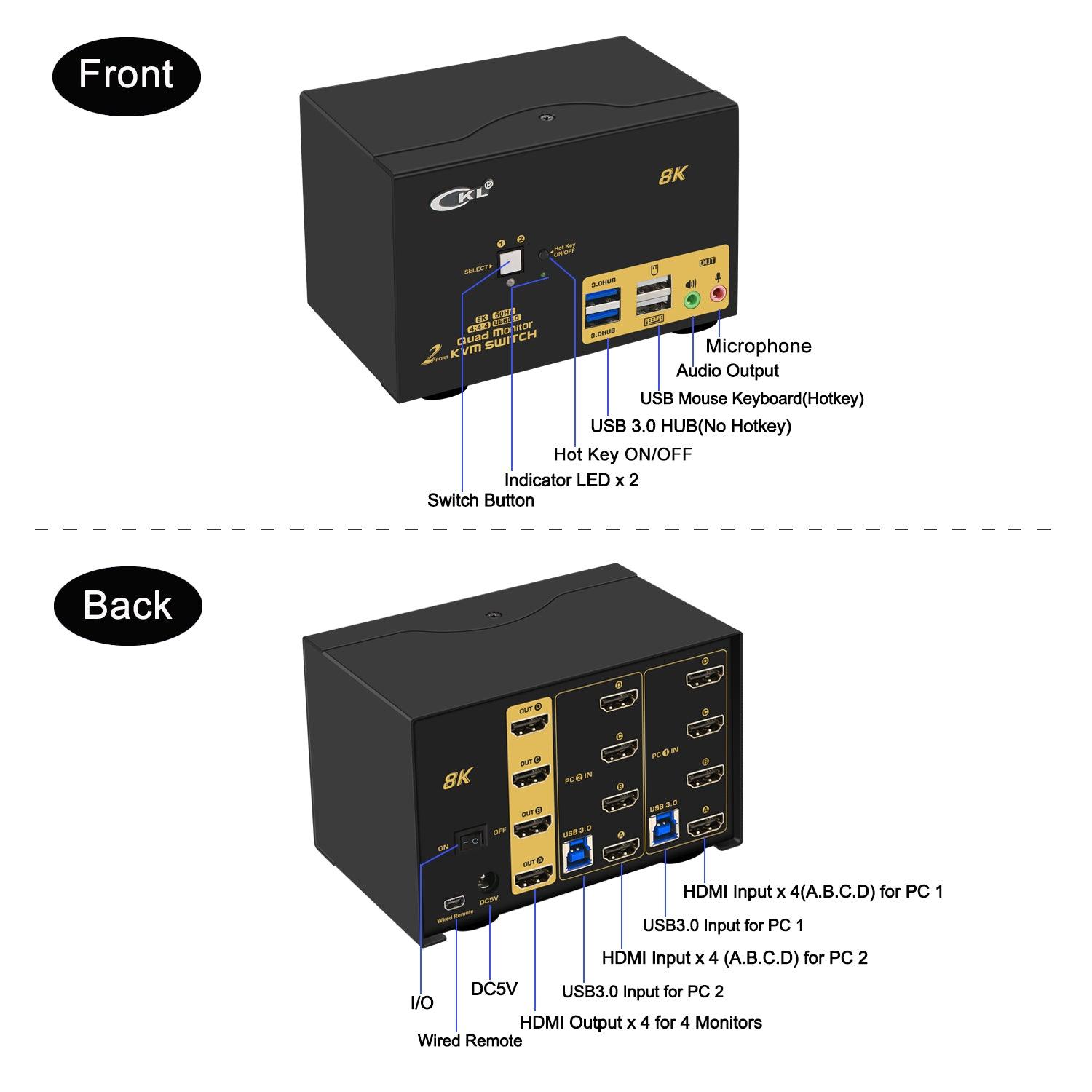
- KVM SWITCH QUAD MONITOR 2 PORT: If you have 2 computers or laptops, one for personal or gaming, the other for work, this is a premium tool for you to control them using 1 set of keyboard, mouse and 4 extended monitors, and share 2 more USB peripherals. Save your space and equipment spending significantly.
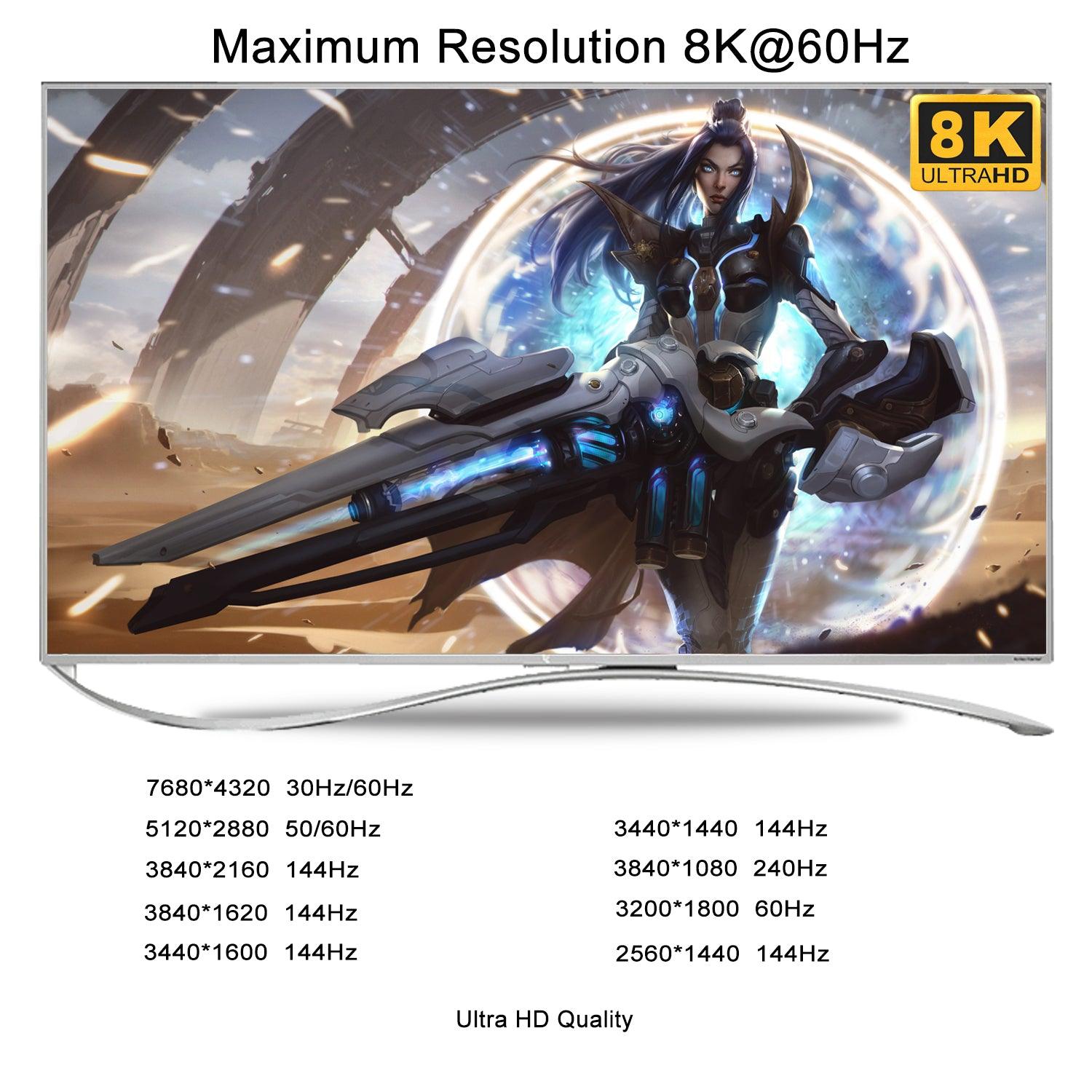
- 8K 60HZ 4K 144HZ KVM SWITCH HDMI: Newest HDMI 2.1 technology to achieve max. Resolution of 7680*4320@30/60Hz, 5120*2880/1440@50/60Hz, 3840*2160@144hz, 3440*1440@144Hz, 3840*1080@240hz, 2560*1440@144hz, ideal for high resolution needs and gaming without delay. Note: this model does not support EDID emulation.
- USB 3.0 KVM SWITCH 4 MONITORS 2 COMPUTERS: The integrated 2 USB 3.0 HUB ports allows you to share 2 more USB peripherals like printers, webcam, flash drives and headset between 2 computers. It has 4 HDMI outputs for extended or mirrored displays on one selected computer at the same time.
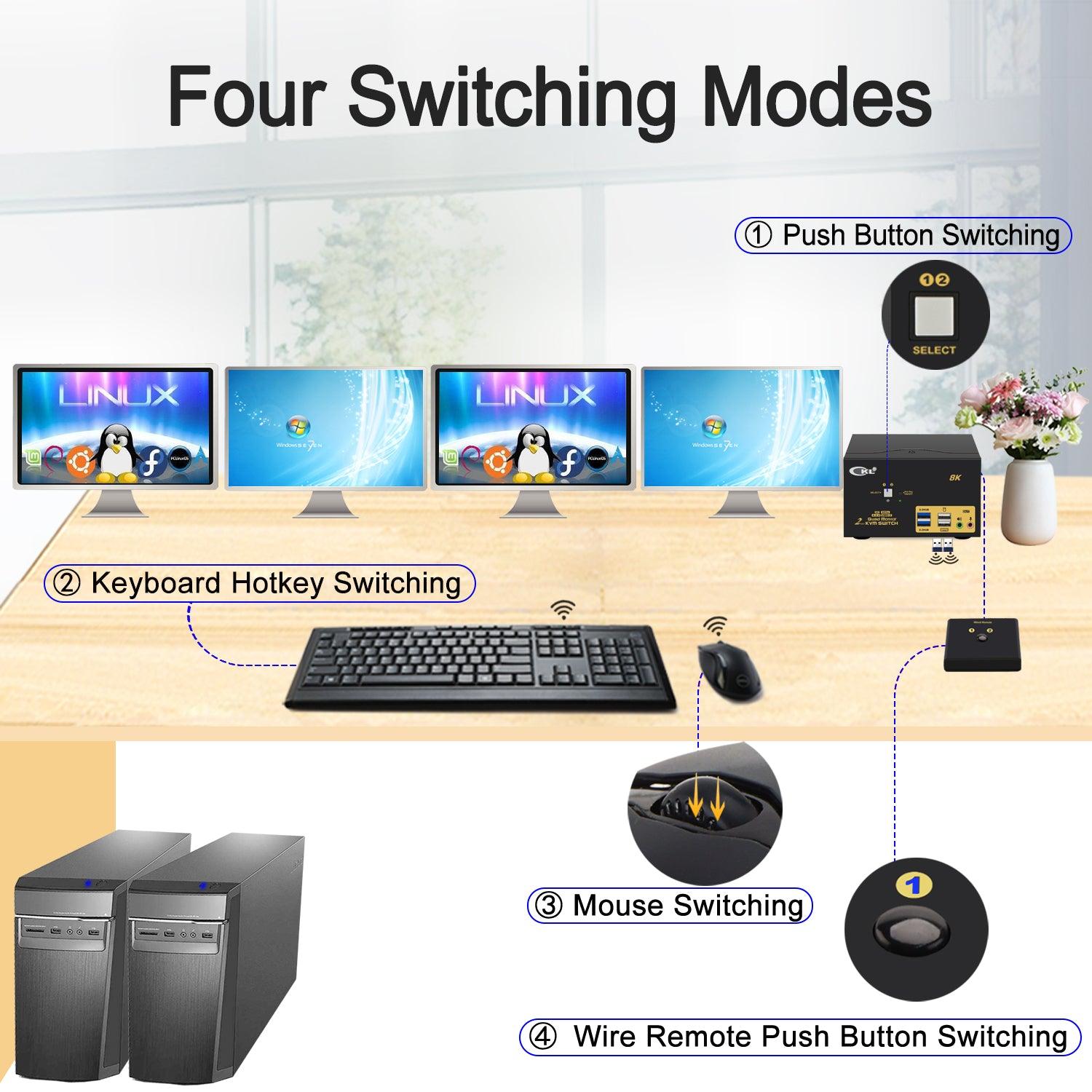
- NOT MANY KVM SWITCHES HAVE 5 SWITCHING MODES: It supports multiple switching modes using keyboard hotkey, mouse roller clicks, push button and wired remote, as well as auto scan with adjustable interval between 8 - 999 seconds for testing and Surveillance purpose.
- HDMI KVM SWITCH WITH AUDIO AND MIC SUPPORT: Supports both 3.5mm stereo speaker output (green) and microphone input (pink) and HDMI digital audio through the same green audio port. Please refer to user manual for how to set the audio and change between the 2 audio options.
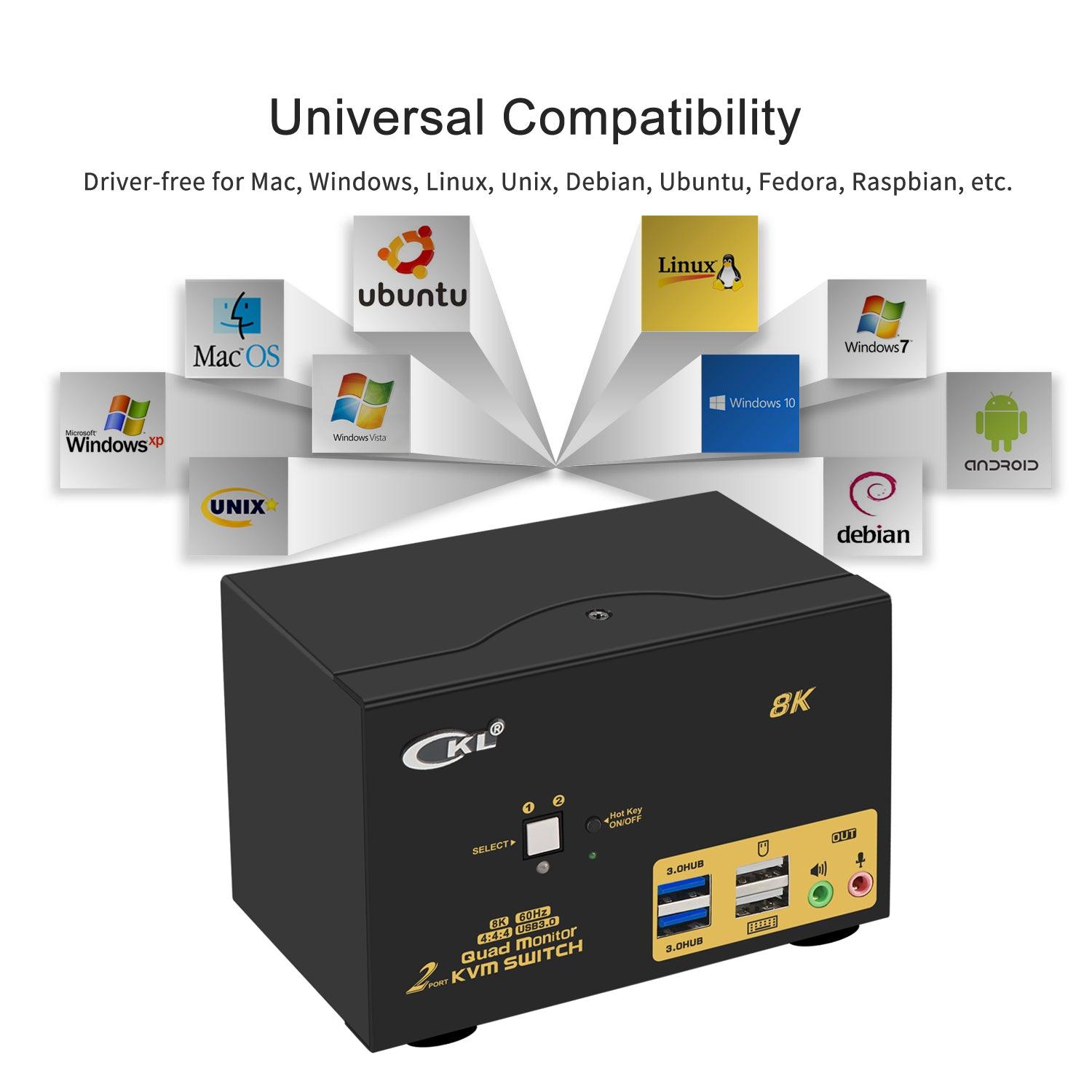
- WIDE COMPATIBILITY AND COMES WITH ALL CABLES NEEDED: Supports Windows, Linux, Mac and most major operation systems, plug and play without any software or driver needed. The package comes with all cables, power adapters except cables for monitors which usually comes with monitors. In most cases, adapters will be needed for computers especially laptops that do not have 4 HDMI outputs.
-
CKL-924HUA-4 2 Port HDMI KVM Switch Quad Monitor 8K@60Hz 4K@144Hz Supports Audio and Microphone
Does Everything Needed!
- 2 computers / laptops share one set of keyboard, mouse, 4 monitors and more USB 3.0 peripherals;
- Quad (4) monitor outputs support up to 8K@60Hz, 4K@144Hz (HDMI 2.1) for extended, mirrored or spliced display;
- Support wired or wireless keyboard and mouse with USB pass-though technology;
- Cross support most major OS including Windows, Linux, Mac;
- Advanced switching modes: keyboard Hotkey, mouse clicks, push button, auto scan and wired remote;
- With 2 extra USB 3.0 HUBs for high speed data transfer up to 5Gbps (10 times faster than USB 2.0) ;
- The USB 3.0 cable Also draws power from USB 3.0 port on computers to drive the KVM switch;
- Support HDMI digital audio (default) and swapping between computers.
- Include all cables needed except cable for monitors
-
Installation Procedures
- Power off everything before installation;
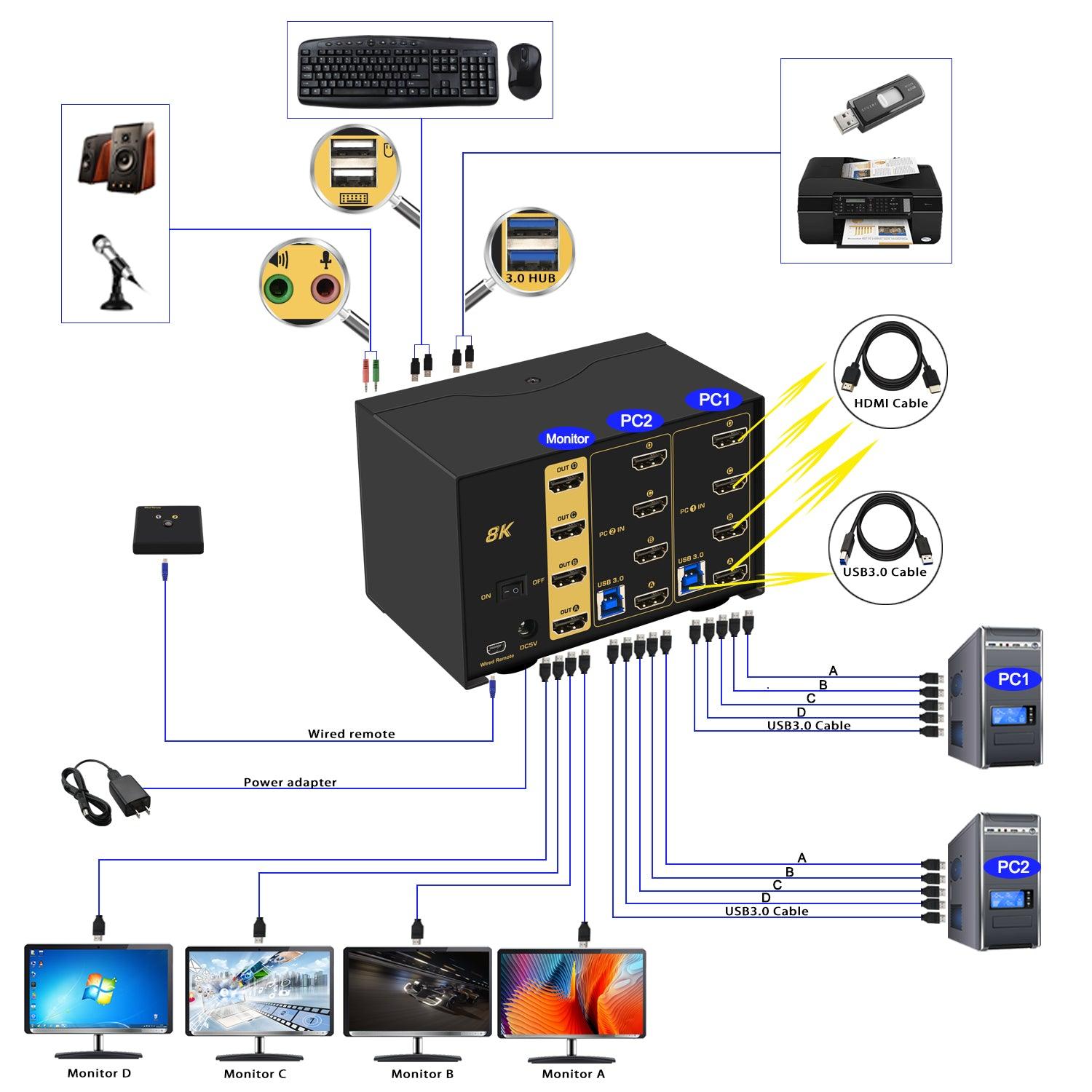
- Computer 1: Connect 4 HDMI outputs from computer 1 to PC1 IN A, B ,C ,D ports; Connect USB A-male to USB 3.0 port on computer 1, and USB B-male to USB 1 input on the KVM switch;
- Computer 2: Connect 4 HDMI outputs from computer 1 to PC2 IN A, B ,C ,D ports; Connect USB A-male to USB 3.0 port on computer 2, and USB B-male to USB 2 input on the KVM switch;
- Monitor A: Connect primary monitor to HDMI Out A;
- Monitor B: Connect extended monitor to HDMI Out B;
- Monitor C: Connect extended monitor to HDMI Out C;
- Monitor D: Connect extended monitor to HDMI Out D;
- Keyboard and Mouse: Connect keyboard and mouse into USB keyboard and mouse port respectively;
- Connect USB peripherals to USB 3.0 ports if needed (optional);
- After cables being connected, power on the kvm switch first, then monitors, then computers.
Friendly Reminder:
1. Some keyboard with special features like gaming, programing, multi-media, mechnical, back lights may not be well supported on the USB keybaord and mouse port which are dedicated for hotkeys, if so you can plug the keyboard and mouse into the USB 3.0 ports or turn off the hotkey then the USB keyboard and mouse port will turn into standard USB 2.0 port, without hotkeys, you can use the included wired remoter to switch between computers.
2. If you are using wireless set of keyboard and mouse which share a unifying dongle, you can plug the dongle into either the USB keyboard or mouse port (hotkey supported), or USB 3.0 port (no hotkeys).
3. The USB 3.0 cable also draws power from USB 3.0 port on computers to drive the KVM switch, also included a USB to DC power cord as additional power supply if in case the computer does not have a USB 3.0 port.
Adapters Will be Needed in Most Cases
This KVM switch supports HDMI digital output only. Make sure you select HDMI Audio Output or Monitor A audio (monitor on HDMI Out A) as default in your sound settings. Do not select your audio device as default sound device, otherwise the audio would not work properly. Some older monitors which do not support HDMI audio will not work with the audio fuction. The workaround is to add an USB to Audio adapter (Ref. ASIN B00IRVQ0F8 on amazon.com) to one of the USB 3.0 HUB ports on the front panel.
CKL-924HUA-4 Four-Monitor Compatibility
| Check | Requirements and limits |
|---|---|
| Two computer inputs | Connect each computer to its own input group: four HDMI video connections to PC1 IN A/B/C/D or PC2 IN A/B/C/D, plus one USB connection to the matching USB input. Eight computer-side HDMI connections in total. |
| Four monitor outputs | Connect four HDMI monitors to HDMI OUT A, B, C and D. OUT A is the primary monitor connection. The four monitors display the selected computer. |
| Operating systems | Windows, Linux and Mac are listed in the manual. Four-monitor use also requires the computer and its graphics hardware or dock to support four display outputs; OS compatibility alone does not establish four-display capability. |
| HDMI requirements | The manual specifies HDMI 2.1 compliance. Each display needs its own video connection. Confirm that the computer outputs, monitors, cables and any adapters support the intended resolution and refresh rate. |
| Display modes | Extended, duplicated (mirrored) and spliced displays, depending on the computer's display settings and capabilities. |
| Adapters and laptops | If the computer lacks four native HDMI outputs, confirm a compatible adapter or docking arrangement before purchase. The manual states that adapter compatibility depends on adapter quality and that resolution is limited by the adapters used. Avoid adapters at both ends of the same video chain. Four adapters alone do not establish four-display support. |
| Resolution and refresh rate | The manual lists up to 7680 × 4320 at 60 Hz (8K) and 3840 × 2160 at 144 Hz (4K), plus 480i, 480p, 720p, 1080i and 1080p. These are supported-mode specifications, not a guarantee for every computer, adapter and monitor combination. The manual does not specify HDR, VRR, chroma, bit-depth or compression conditions. Confirm the complete setup for high-bandwidth modes. |
| Audio and microphone | HDMI audio and separate 3.5 mm speaker/microphone connections are described in the manual. Its sound-settings section covers selecting the HDMI display or 3.5 mm loudspeaker as the default playback device for the connection used. Audio on outputs B–D is not individually confirmed in the manual. |
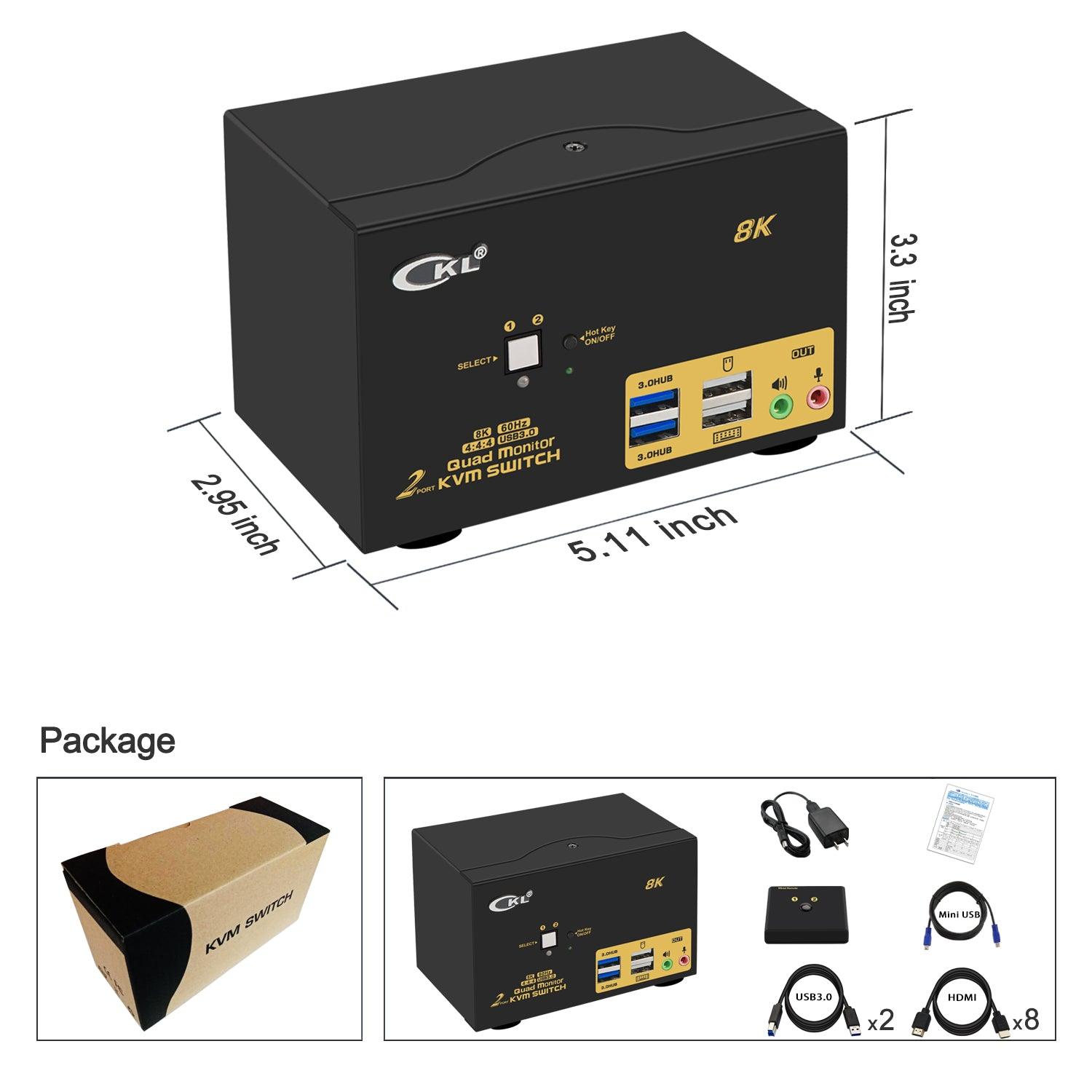
| Included cables | The CKL-924HUA-4 product listing specifies eight 4.92 ft HDMI cables for computer-to-KVM connections, two 4.92 ft USB 3.0 cables, a USB-to-DC power cable, and a mini USB cable with wired remote. Monitor HDMI cables are not included. The manual confirms full computer-side HDMI/USB cable sets but does not itemize model-specific lengths. |
| Exclusions and cautions | No EDID emulation, as stated in this product listing. Native monitor connections are HDMI; VGA and DVI monitors are not preferred in the manual. Do not assume universal USB-C/Thunderbolt or non-HDMI monitor compatibility. Some gaming or mechanical keyboards may need the USB 3.0 hub ports instead of the dedicated hotkey ports. |
Reference: 8K HDMI KVM Switches User Manual, especially pages 4–5 and 10–13, together with the CKL-924HUA-4 model-specific connection and box-content details on this page.
5 Switching Modes
- Keyboard Hotkey
- Double Click the middle roller of mouse
- Push Button on front panel.
- Wired remote switch
- Auto Scan with adjustable interval time between 8-999 seconds
3 Display Modes
- Extended Display
- Mirrored Display
- Spliced Display
Universal Compatibility
Cross support most major OS including Windows, Linux, Mac and more.
What's in the box
1* 2 Port Quad Monitor HDMI KVM switch
1* USB to DC Power Cable
1* User manual in English
1* Mini USB Cable+Wired Remoter
8* HDMI Cables (4.92ft)
2* USB3.0 Cables (4.92ft)
Note:
The HDMI cables for monitor is not including!
Choose options