Статья: Top USB C KVM Switches For Apple Studio Display And 2 Laptops
Top USB C KVM Switches For Apple Studio Display And 2 Laptops
- Understanding USB-C KVM Architecture For Multi-Laptop Configurations
- Signal Integrity And EDID Considerations
- Exploring Professional USB-C KVM Solutions
- Featured Solution: CKL-62T-T Dual-Monitor USB-C KVM Switch
- Key Specifications For Apple Studio Display Compatibility
- Resolution And Refresh Rate Requirements
- USB Data Throughput Considerations
- Optimizing Dual-Laptop Workflows With Strategic KVM Deployment
- Hotkey Programming Best Practices
- Addressing Common USB-C KVM Integration Challenges
- Intermittent Display Detection Issues
- Peripheral Device Compatibility Quirks
- Future-Proofing Your USB-C KVM Investment
- Frequently Asked Questions About USB-C KVM Switches
- Can A USB-C KVM Switch Charge My Laptops While Switching?
- Do USB-C KVMs Work With Non-USB-C Computers?
- How Does Switching Speed Compare Between Models?
Modern workflows demand unprecedented flexibility. IT professionals juggle development environments, designers toggle between rendering stations, and data center managers orchestrate sprawling infrastructures—all requiring instantaneous access to multiple computing ecosystems. The proliferation of USB-C connectivity has revolutionized peripheral integration, yet simultaneously complicated multi-computer workflows. When your arsenal includes an Apple Studio Display and dual high-performance laptops, the quest for seamless switching transcends mere convenience; it becomes operational imperative.
USB-C KVM switches eliminate the peripheral chaos that plagues contemporary workspaces. Rather than maintaining separate input devices for each machine or enduring the friction of constant cable swapping, these sophisticated devices consolidate control. For professionals leveraging Apple's flagship display alongside portable workstations, the engineering challenges multiply—requiring solutions that honor the Studio Display's exacting specifications while accommodating diverse laptop platforms.
Understanding USB-C KVM Architecture For Multi-Laptop Configurations
Traditional KVM technology relied upon discrete video and peripheral connections. Contemporary USB-C implementations fundamentally reimagine this paradigm by consolidating DisplayPort alternate mode, USB data transmission, and power delivery within unified interfaces. This convergence enables streamlined cabling topologies that minimize desk clutter while maximizing bandwidth allocation.
For configurations encompassing an Apple Studio Display plus dual laptops, the KVM switch must adjudicate between competing protocol requirements. The Studio Display demands sustained DisplayPort 1.4 signaling to achieve its native 5K resolution at 60Hz with P3 wide color gamut fidelity. Simultaneously, peripheral USB traffic—keyboards, mice, webcams, audio interfaces—requires dedicated bandwidth allocation to prevent latency or dropouts during switching events.
Signal Integrity And EDID Considerations
Extended Display Identification Data (EDID) emulation represents a critical yet frequently overlooked functionality. Without proper EDID management, displays exhibit maddening behavior when switching between sources: prolonged handshake delays, resolution resets, or complete signal loss. Professional-grade switches actively emulate EDID to downstream sources, maintaining consistent display parameters regardless of active input.
This becomes particularly salient with Apple Studio Display integration. The display's intricate capabilities—Thunderbolt hub functionality, integrated A13 processor, spatial audio array—require meticulous handshaking protocols. Current CKL USB-C KVM Switches lack support for these handshake routines, which we aim to implement in the upcoming generation.
Exploring Professional USB-C KVM Solutions
The landscape of USB-C KVM switches spans consumer-oriented adapters to enterprise-hardened appliances. Discerning which category aligns with operational requirements demands scrutiny of specifications beyond marketing hyperbole.
CKL's comprehensive USB-C KVM switch collection addresses the full spectrum of multi-computer switching scenarios. Engineered since 2004, these solutions embody accumulated expertise in signal routing, peripheral compatibility, and industrial durability. Whether deploying desk-mounted units for individual power users or rack-integrated systems for data center orchestration, the portfolio encompasses plug-and-play implementations that honor exacting resolution requirements up to 8K while providing instantaneous hotkey switching capabilities.
Featured Solution: CKL-62T-T Dual-Monitor USB-C KVM Switch
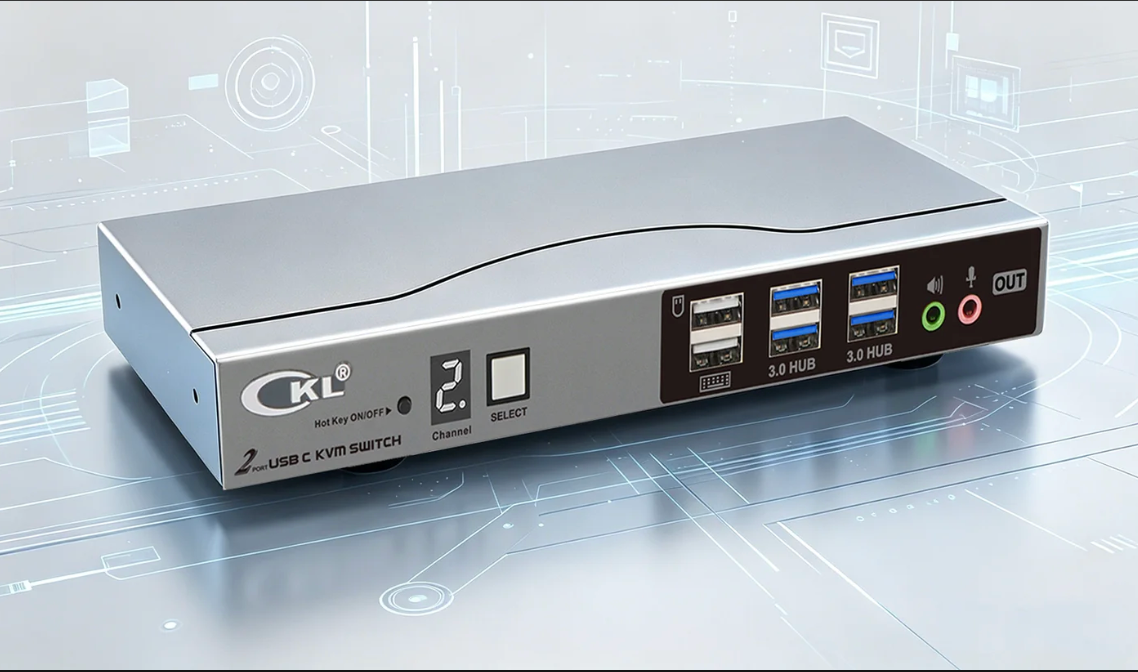
For professionals seeking purpose-built hardware to unite Apple Studio Display with dual laptop configurations, the CKL-62T-T emerges as an exemplary implementation. This dual-monitor USB-C KVM switch accommodates two computers with comprehensive peripheral sharing and robust display output capabilities.
The unit's architecture supports 5K@60Hz for direct USB C connection to Apple Studio Display without any rendering, ensurs crisp visual fidelity for color-critical workflows. Four USB 3.0 ports enable peripheral consolidation—mechanical keyboards, precision mice, external storage, authentication tokens—all seamlessly transitioning between source computers via straightforward hotkey commands or front-panel button activation.
EDID emulation ensures the Apple Studio Display maintains optimal parameters during switching operations, eliminating the resolution renegotiation delays that plague lesser solutions. The plug-and-play design requires no driver installation or software intermediaries, honoring diverse operating system environments from macOS to Windows to Linux distributions. This versatility proves invaluable for heterogeneous computing environments where cross-platform development or testing occurs.
Key Specifications For Apple Studio Display Compatibility
Apple's Studio Display establishes formidable technical benchmarks. Its 5120×2880 native resolution, 600-nit brightness, and True Tone technology demand KVM switches capable of preserving signal integrity across the entire capability envelope.
Resolution And Refresh Rate Requirements
Minimum viable specifications for Studio Display integration include:
- USB‑C (DP Alt Mode), Thunderbolt 3/4 or USB4 on laptops are required, with sufficient DisplayPort 1.4 bandwidth.
- 5K (5120×2880) resolution capability at 60Hz
- 10-bit color depth preservation for P3 wide gamut accuracy
- HDR metadata passthrough for compatible content workflows
Compromising on any dimension degrades the display's value proposition. A switch limited to 4K output forces resolution downscaling, sacrificing the Studio Display's pixel density advantage. Insufficient bandwidth throttles refresh rates or color depth, introducing banding artifacts in gradient-heavy design work.
USB Data Throughput Considerations
The Studio Display incorporates a three-port USB-C hub for downstream peripheral connectivity. KVM switches must either integrate these peripherals directly or provide sufficient USB ports to accommodate relocated devices. USB 3.0 represents the baseline standard, delivering 5Gbps throughput adequate for most peripherals. However, workflows involving high-speed storage or real-time audio interfaces benefit from USB 3.1 Gen 2 implementations offering 10Gbps capacity.
Optimizing Dual-Laptop Workflows With Strategic KVM Deployment
Beyond hardware specifications, operational methodology profoundly impacts productivity outcomes. Strategic KVM deployment transforms switching from interruption into fluid workflow component.
Hotkey Programming Best Practices
Most professional KVM switches support customizable hotkey sequences—typically Scroll Lock double-tap or Ctrl+Ctrl combinations followed by numeric identifiers. Committing these sequences to muscle memory eliminates cognitive overhead during context switching. For dual-laptop configurations, consider assigning primary development environment to Computer 1 and testing/client environment to Computer 2, establishing consistent mental models.
For home office environments with Apple Studio Display and dual laptops, desktop configurations typically prove most pragmatic. The switches occupy minimal desk real estate while providing tactile switching controls within arm's reach.
Addressing Common USB-C KVM Integration Challenges
Despite technological maturation, USB-C KVM deployments occasionally encounter friction points requiring troubleshooting acumen.
Intermittent Display Detection Issues
When displays fail to recognize switched inputs consistently, EDID corruption or incompatibility typically underlies the symptom. Verify the KVM switch implements active EDID emulation rather than passive passthrough. Some units offer EDID learning modes where the switch captures display capabilities during initialization, then persistently broadcasts these parameters to inactive sources.
Peripheral Device Compatibility Quirks
Certain peripherals—particularly those with proprietary drivers or specialized functionality—exhibit temperamental behavior through KVM switches. Wireless receiver dongles for mice or keyboards occasionally require direct computer connection rather than switch-mediated routing. High-bandwidth devices like external GPUs or Thunderbolt storage arrays may exceed KVM USB port capabilities, necessitating direct laptop connection.
Future-Proofing Your USB-C KVM Investment
Technology trajectories suggest escalating resolution and bandwidth requirements. The emergence of 8K displays, 240Hz refresh rates, and Thunderbolt 5's 120Gbps throughput herald next-generation demands that current mid-tier switches cannot satisfy.
When evaluating USB-C KVM switches for Apple Studio Display plus dual-laptop configurations, prioritize solutions with headroom beyond immediate requirements. A switch supporting 8K@60Hz or 4K@144Hz provides runway for future display upgrades without necessitating KVM replacement. Similarly, firmware-updatable models enable protocol enhancements as standards evolve.
Frequently Asked Questions About USB-C KVM Switches
Can A USB-C KVM Switch Charge My Laptops While Switching?
No, PD charging port is not available on CKL KVM Switches. The USB C ports on these KVM switches are only for video input and output.
Do USB-C KVMs Work With Non-USB-C Computers?
No, as current USB C adpaters only works with uni-direction from USB C to DisplayPort or HDMI or VGA, they are not able to work bi-directionally.
How Does Switching Speed Compare Between Models?
Professional-grade switches achieve sub-second switching latency, typically 1-3 seconds for complete handshake and peripheral reinitialization. Consumer models may require 5-10 seconds as displays renegotiate parameters. For workflows demanding rapid context switching, prioritize switches explicitly specifying fast-switching technology and robust EDID emulation.